NURBS
B-splines — rational ones are NURBS — are the freeform half of the
kernel: BSplineCurve and BSplineSurface, built from a degree,
control poles, a knot vector and optional weights. Where
Elementary covers the ten closed forms,
this module covers everything else. The math foundations below are
adapted from
The mathematics behind free-form geometry;
the API pages are Curves, Surfaces and
Editing & fitting.
From Bézier to B-spline
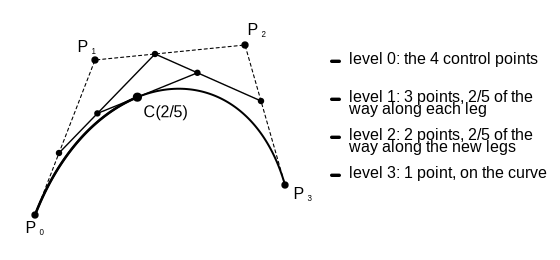
A Bézier curve stores control points instead of polynomial coefficients, and evaluates them with the de Casteljau algorithm — repeated linear interpolation, one level per degree.
The blending behind it is the Bernstein basis — one hump per control point:
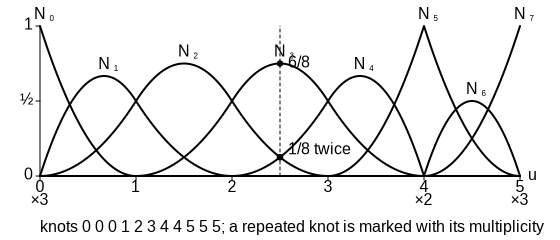
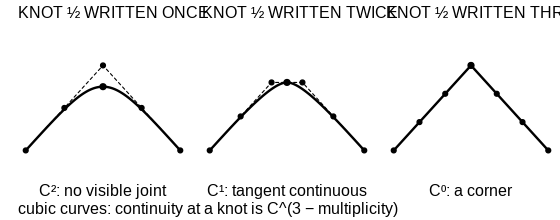
A B-spline generalises this to several spans: piecewise polynomials joined at knots. Knot multiplicity steers continuity — a simple knot is smooth, a full-multiplicity knot is a hard corner and a place the curve can be split:
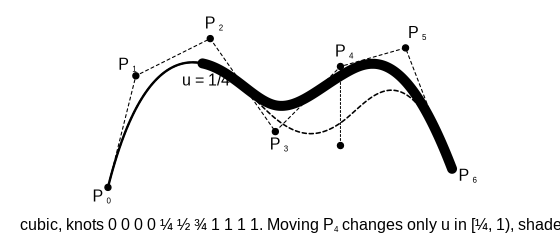
Moving one control point only moves the spans it touches — editing is local:
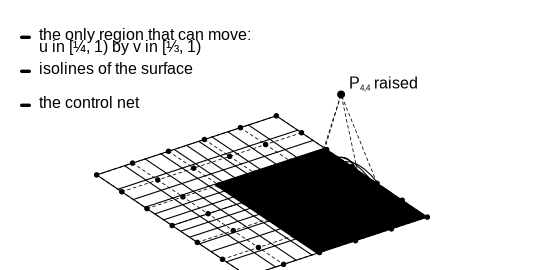
The same holds on a surface: a pole of a bicubic patch moves only the cells it supports — here 3 × 2 of the 4 × 3 spans — and the rest stays flat.
Rational curves
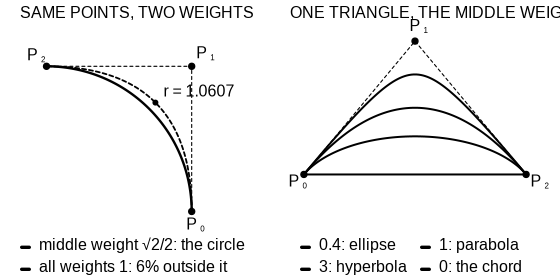
Give each pole a weight and the curve is pulled toward the heavy ones.
With the right weights a quadratic reproduces the circle exactly —
this is why the conics of the previous chapter convert losslessly with
to_bspline, and why NURBS, not plain B-splines, are the interchange
workhorse.
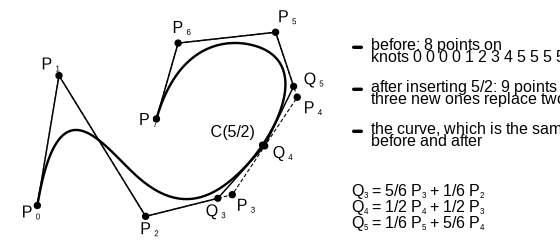
Inserting a knot refines the control polygon without changing the shape — the operation behind refinement, splitting and extraction in Editing & fitting:
In geomcore
- Poles are stored Cartesian, once, with a separate weight per pole when rational — no second homogeneous copy (ADR 0008). Evaluation, editing and projection all read them in place.
- Every curve or surface is either elementary or a B-spline — there is no third representation, and exact conversions bridge the two.
- The running example below is the geomdl tutorial curve as a clamped degree-2 B-spline. The viewer evaluates B-splines in the page with de Boor, so the display refines as you zoom.
This module
- Curves — create, evaluate, sample with proven bounds.
- Surfaces — patches, evaluation, fitting grids.
- Editing & fitting — knots, degree, splitting, interpolation, approximation, exact conversions, measure and bound.